DIY Installation Guide: How to Set Up a Wireless Backup Camera in Your Vehicle
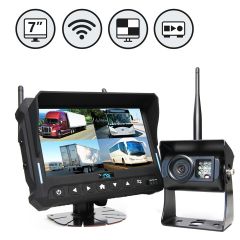
A backup camera system for your vehicle boosts safety by monitoring the rearview. Also, it makes reversing or parking easy, secure, and convenient. Installing a wireless backup camera to your vehicle might seem complex; however, choosing the right manufacturer and understanding the process can make it way easier than you think.
A wireless backup camera is an effective solution for DIY installation as there is no complicated wiring to deal with. All you have to focus on is the simple DIY setup for your vehicle, which vehicle owners, fleet owners, and drivers can do themselves without any professional help.
Unlike traditional wired backup camera systems, these are a simple, plug-and-play system that takes less than 15 minutes to install. Still, most people are unaware of the procedure and expect it to be complicated; hence, it becomes overwhelming to even try.
In this article, we are laying out the entire step-by-step process to set up your wireless backup camera syst.
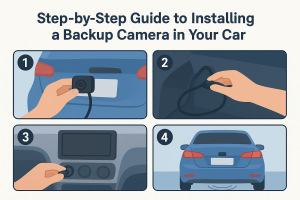
Step-by-Step DIY Installation Guide For Setting Up Your Wireless Backup Camera
Step 1: Choose The Right Backup Camera System
Your DIY wireless backup camera installation experience depends upon the camera system you choose. So, make sure you opt for the right one that suits your vehicle requirements, such as size, configuration, etc.
Also, depending upon your specific needs, you can pick the advanced features further. For example, if you have a large vehicle that drives most of the night, then perhaps choosing cameras with optimum signal reception night vision capabilities would be perfect.
Step 2: Figure Out Where To Mount
You need to identify the mounting position or location of the backup camera system for your vehicle. Ideally, it must be fixated at the rear center of your vehicle to achieve the best field of view possible.
For smaller vehicles like cars or larger ones like trucks, the location can be space above or around the license plate. For RVs and trailers, you can put them around the top center to ensure they have an obstruction-free field of view.
However, feel free to try and test a few spots as per your specific vehicle to maximize the view.
Step 3: Test The Backup Camera System Before You Install
Testing the backup camera system before you install it is crucial. This ensures that the wireless camera system you bought is properly functioning. Not testing can later waste a lot of your time and effort if it doe/sn’t work after you’ve installed it.
Step 4: Connect, Assemble, And Mount The Camera
Assemble all the components of the wireless backup camera system together and use the adhesive or screws to securely mount the system at the chosen spot. Make sure you read the user manual, which features specific installation instructions provided by the manufacturers of your camera system.
Check the level to see whether it is able to capture the full view and adjust accordingly. You can also use a sealant around the mounting area to prevent moisture from affecting the area.
This also can be a great time to mount the waterproof backup alarm at the back of your vehicle that emits a loud signal while reversing, informing pedestrians of the movement.
Read More: 5 Key Reasons Why AI Pedestrian Detection Systems Are The Future Of SiteSafety.
Step 5: Powering Up The Camera Safety.
Since you’re installing a wireless camera, you don’t have to worry about connecting wires. Most of these wireless camera systems can be easily connected to the reverse light circuit of your vehicle to power it up. Many other wireless backup camera systems come with battery packs and magnetic bases that get easily attached to the vehicle’s dashboard.
You have to make sure the camera automatically activates and displays the feed on the monitor as soon as you shift your gear to reverse. The camera system often features wireless backup camera sensors to detect blind spots. You can also install them.
Step 6: Install The Camera Monitor
Before installation, you need to decide where to mount the camera monitor. This should be a spot that doesn’t create any obstruction while you are driving. Also, it must be easily visible and comfortable to look at while reversing or parking. Usually, it is best mounted right above the rearview mirror or on the dashboard.
Then, make sure to add a power connection to the monitor. Once you do, finally pair it with your camera to display the camera feed. Refer to the user manual to get more specific instructions as per your model.
Step 7: Making Final Adjustments
Once you have finished the DIY installation, make sure to recheck everything and make final adjustments as required. This will include correcting the camera angle for a maximized field of view so you can see behind while reversing.
Also, potential blind spots should be looked for and eliminated by adjusting the camera angle accordingly.
If everything seems good, don’t forget to take a short test drive where you can monitor how the camera functions, especially while reversing or parking. Check if there is any signal interference where wireless connection often tends to drop.
Additional DIY Installation & Maintenance Tips
-
Gather the specific manufacturer’s user manual for your camera system model along with essential tools such as a screwdriver, adhesive tape (or any other mounting material), smartphone/tablet, sealant, and others as needed.
Ensure regular maintenance to keep your backup camera functional for a long time.
Remember to clean the camera lens regularly to avoid building up dirt that compromises the visibility.
Read More: 6 Installation Tips For Semi-Truck Camera Systems: A Comprehensive Guide
Ensure Safety With Our Top Wireless Backup Camera System
Our wireless backup camera system is specifically designed for DIY or easy installation. They can dramatically improve safety while reversing the vehicle and during parking. Choosing the right manufacturer plays a critical role in optimizing your vehicle's safety and convenience. Also, not all brands are DIY friendly. We at Rear View Safety, a pioneer manufacturer of in-vehicle camera systems for safety, surveillance, and driving, have been known for their versatile, feature-rich, high-end products.
Explore High-Quality Wireless Backup Camera System For Your Vehicle Today!